
LFO
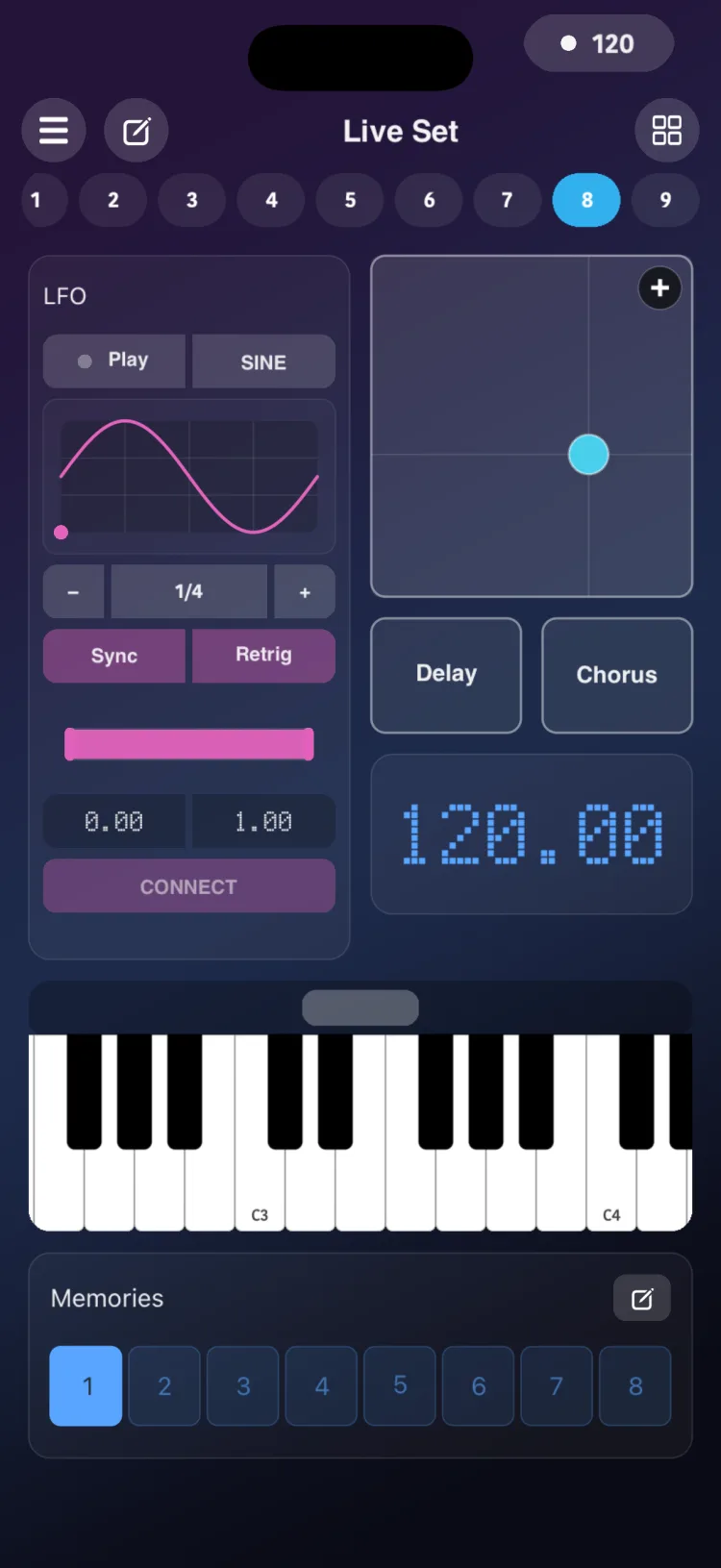
The LFO is a low-frequency oscillator that moves other controls in the scene for you: Faders, Knobs and XY Pad axes, in any mode. It follows a waveform, either synced to the tempo or with a free period.
Use it for breathing filters, tremolo, auto-panning, slow effect sweeps or random changes, without touching anything.
Getting started
- In the Editor, add LFO from the MACRO section of the palette. It has a fixed size of 8×16 cells.
- Connect its targets (see the next section).
- In Perform, tap Play. The LFO moves its targets, and they send their own MIDI or OSC. If a target is a Fader or Knob in Macro mode, it in turn moves its own targets.
- Adjust Curve, Rate, Sync, Retrig and the MIN / MAX range live.
Connecting targets
There are two ways:
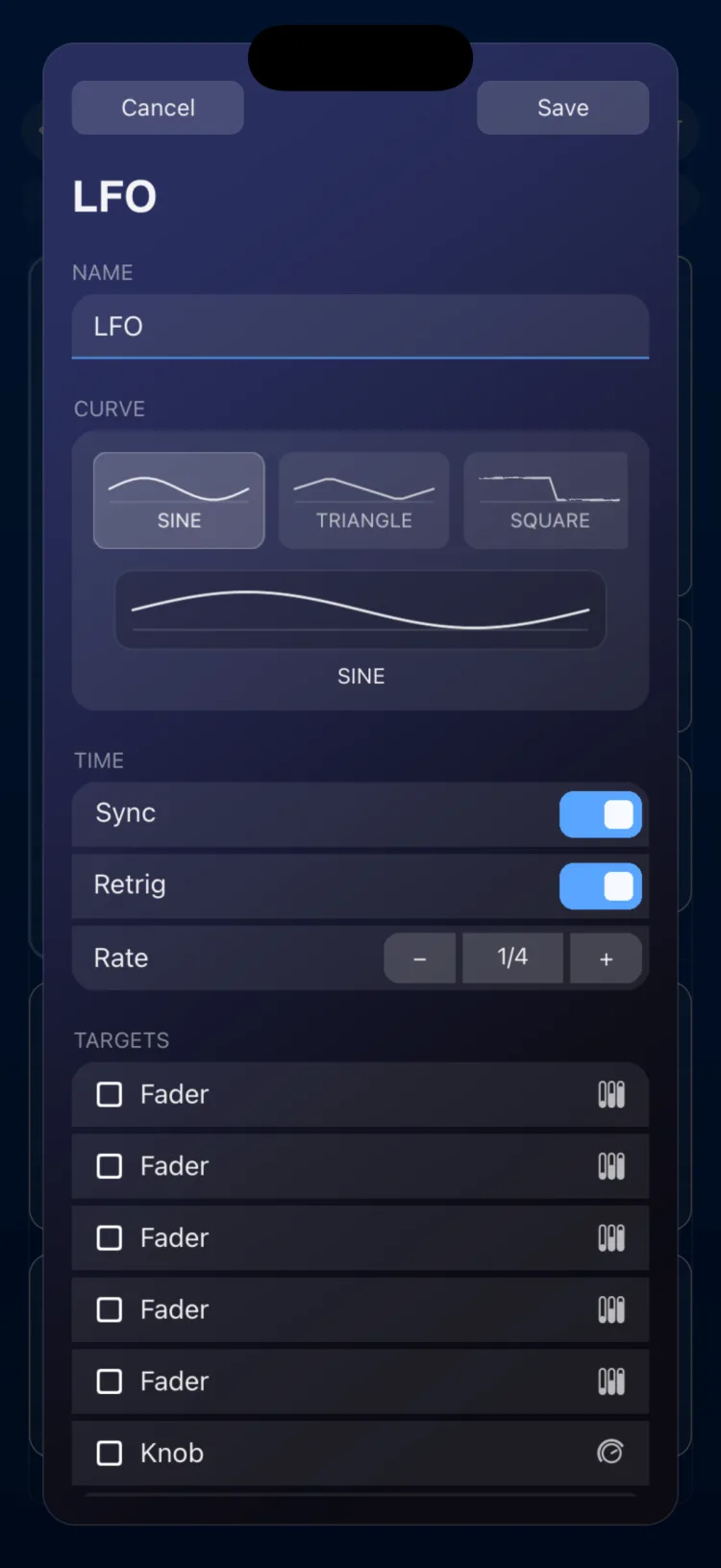
- From the inspector: pick the controls in the Targets section.
- From Perform: 1. Touch and hold CONNECT. 2. Tap the controls you want to move. They can be on any page. 3. Go back to the LFO's page (its page pill blinks so you can find it). 4. Tap CONNECT again to confirm and close the selection.
Possible targets are Faders and Knobs in MIDI, OSC or Macro mode, and XY Pads per axis (X, Y or both).
To remove every connection, use Clear Targets in the inspector (it asks for confirmation).
Options
| Option | Values |
|---|---|
| Curve | 16 shapes: Sine, Triangle, Square, Pulse 25%, Pulse 10%, Saw Up, Saw Down, Exp Up, Exp Down, Log Up, Log Down, S&H, Random, Smooth Rand, Stair Up, Stair Down |
| Rate (Sync on) | 1/64, 1/32, 1/16T, 1/16, 1/8., 1/8, 1/4T, 1/4, 1/4., 1/2, 1/2., 1/1. This is the length of one cycle; − / + step through the list. Default 1/4 |
| Time (Sync off) | cycle period in milliseconds, from 1 ms to 120 s (default 2 s). Works the same in Perform and in the inspector |
| Retrig | On / Off |
| MIN / MAX | 0.00 to 1.00: the portion of each target's travel that the LFO covers. If MIN is greater than MAX, they are swapped |
| Targets | Fader and Knob in MIDI, OSC or Macro mode; XY per axis (X, Y or both) |
| Name | text (inspector) |
| APPEARANCE | Use Global Color / Custom Color (inspector) |
Resolution
Resolution is automatic; there is nothing to set. The LFO computes about 64 values per cycle, between 120 and 500 per second depending on the period. With periods shorter than about 128 ms it reaches the cap of 500 values per second, and each cycle gets fewer points: at 20 ms, there are 10 per cycle.
Over MIDI CC only values that change are sent, so a slow LFO sends fewer messages than a fast one.
Limitations
- MIN and MAX are shared by all of the LFO's targets.
- It does not modulate Pads, Toggles, States, engines or other LFOs.
- Each LFO computes on its own. If you run many fast LFOs at once, the total number of messages can grow quite a lot.
- A State stores the LFO's settings (shape, Sync, Rate, period and range), but not its Play/Stop or its connections.
- Macro Play can start and stop it, but not mute it.
- Fixed size of 8×16 cells on iPhone and iPad.