
Toggle
The Toggle is a two-state switch, On and Off. It works in MIDI, MACRO or OSC mode.
What it's for
- MIDI: turn on effects, mute, sustain (CC 64) or any on/off parameter.
- OSC: trigger scenes, layers or effects in software over the network.
- MACRO: move several controls from a state A to a state B with a single tap. For example, a "chorus mode" that raises the reverb, opens a filter, turns on a pad and changes the chord of the Drone Pad.
Adding a toggle
- Open the Editor.
- In the palette, choose Toggle in the MIDI, MACRO or OSC section.
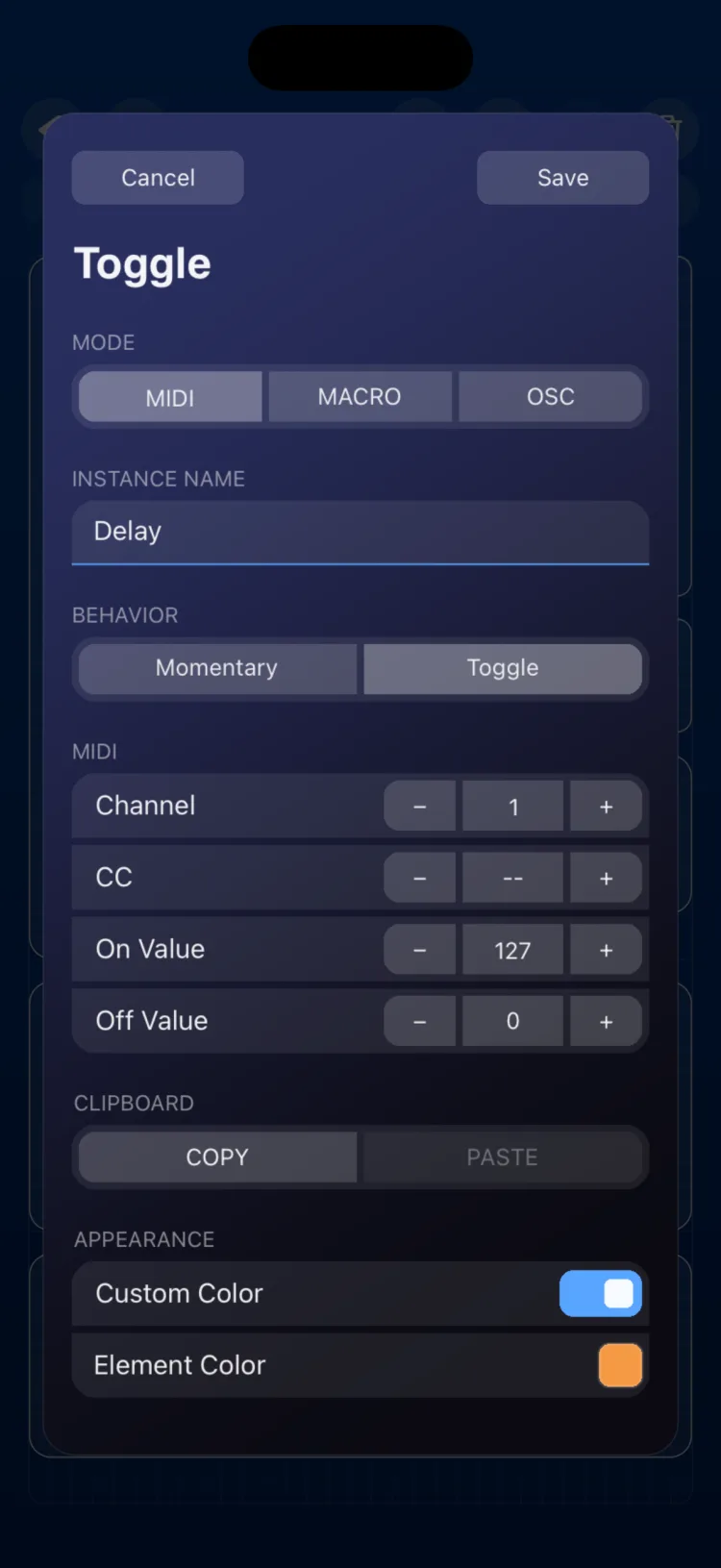
- Double-tap the control to open the inspector.
- Choose the behavior and the values for the mode, then tap Save.
Using it in Perform
Tap it. What happens depends on BEHAVIOR:
- Toggle (default): each tap switches between On and Off.
- Momentary: it stays On only while you hold it down.
Inspector options
| Section | Option | Values |
|---|---|---|
| MODE | MIDI · MACRO · OSC | |
| INSTANCE NAME | Text | |
| BEHAVIOR | Momentary / Toggle | Default: Toggle |
| MIDI | Channel / CC | 1–16 / 0–127 |
| MIDI | On Value / Off Value | 0–127 (defaults 127 / 0) |
| OSC | Output, Path, Custom Path | See MIDI and OSC connections |
| OSC | On Value / Off Value | Decimal number, sent as FLOAT (defaults 1.0 / 0.0) |
| MACRO | Targets | See below |
| MACRO | Duration | 0–5 s in 0.1 s steps; 0 = Instant |
| CLIPBOARD | COPY / PASTE | |
| APPEARANCE | Use Global Color / Custom Color |
Macro mode
In Macro mode, the toggle defines two complete states of your surface: what happens at Off and what happens at On. When you tap it, all its targets change together.
| Target | What you set |
|---|---|
| Fader or Knob (not Macro) | Value at Off and value at On (0–127, or the target's OSC range) |
| XY Pad | Values at Off and at On for each axis, X and Y |
| Toggle (not Macro) | State at Off and at On |
| Pad in Toggle mode | State at Off and at On |
| Drone Pad | Mute, active root notes and chord at Off and at On |
- Targets can be on any page of the scene.
- Duration controls the transition between Off and On for continuous targets (Fader, Knob and XY Pad). At 0 the change is instant; with higher values, the controls glide to their new value over that time, up to 5 seconds.
Step by step, including live assignment, in Fader, Knob and Toggle in Macro mode. More on the modes in MIDI, MACRO and OSC modes. To recall the state of many controls with more options, see also State.
Limits
- The toggle's OSC value is always sent as FLOAT.
- A toggle in Macro mode can't be the target of another toggle in Macro mode.
- The OSC Output and Path you set in the Page Inspector don't apply to the toggle; set them in its own inspector.
Grid size on iPhone and iPad
In cells (width × height):
| Device | Minimum | When created | Maximum |
|---|---|---|---|
| iPhone | 4×2 | 6×2 | 16×6 |
| iPad | 3×1 | 4×2 | 12×9 |