
Drone Pad
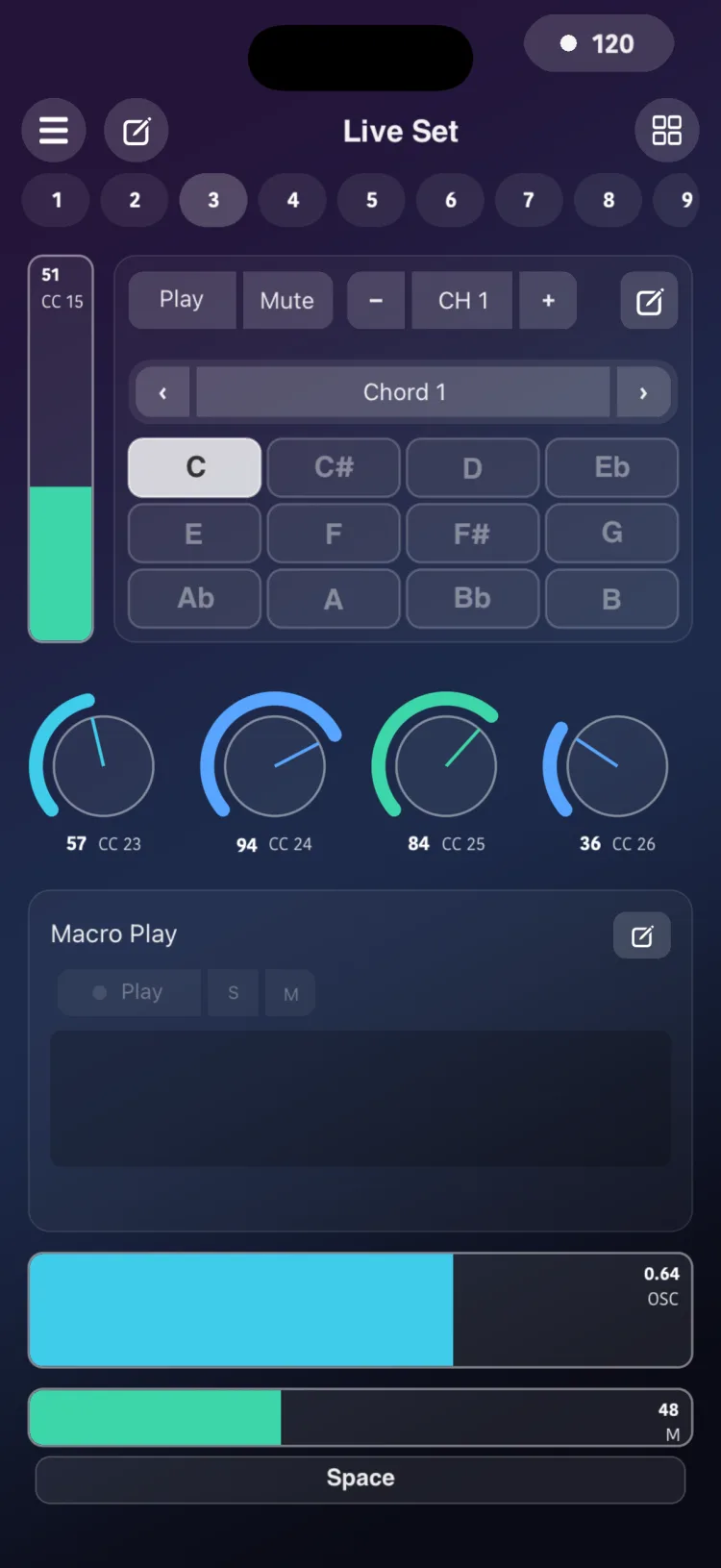
The Drone Pad generates sustained pads. You pick a key from the 12 notes and RigAstra keeps a full chord sounding on your instrument, using the factory voicings or your own.
Use it for background pads in worship, ambient, transitions and spoken moments: you change key with one tap, without playing the chord.
Getting started
- In the Editor, add Drone Pad from the MIDI section of the palette.
- Switch to Perform and tap Play.
- Tap one of the 12 notes (C to B): the selected chord plays on that root.
- Tap another root to change key, or the same one to turn it off. Only one root plays at a time.
- Pick the chord with the module's Factory / User selector.
The module header has Play / Stop, Mute, the channel (CH − / +) and access to the inspector.
Mute works like a Stop/Play that doesn't stop the engine: muting turns off the chord's notes, and unmuting plays the chord again. While muted, Play, changing chord, channel or mode stay silent until you unmute.
Playback modes
- Sample: designed for sample-based instruments whose notes fade out on their own. RigAstra retriggers the chord notes, one by one and staggered, before the sample ends. With five notes, for example, the order is 1, 3, 5, 2, 4. The cycle lasts 98% of the Sample Length.
- Synth: the notes stay held, with no retriggering. Use it with synthesizers that have infinite sustain.
User chords
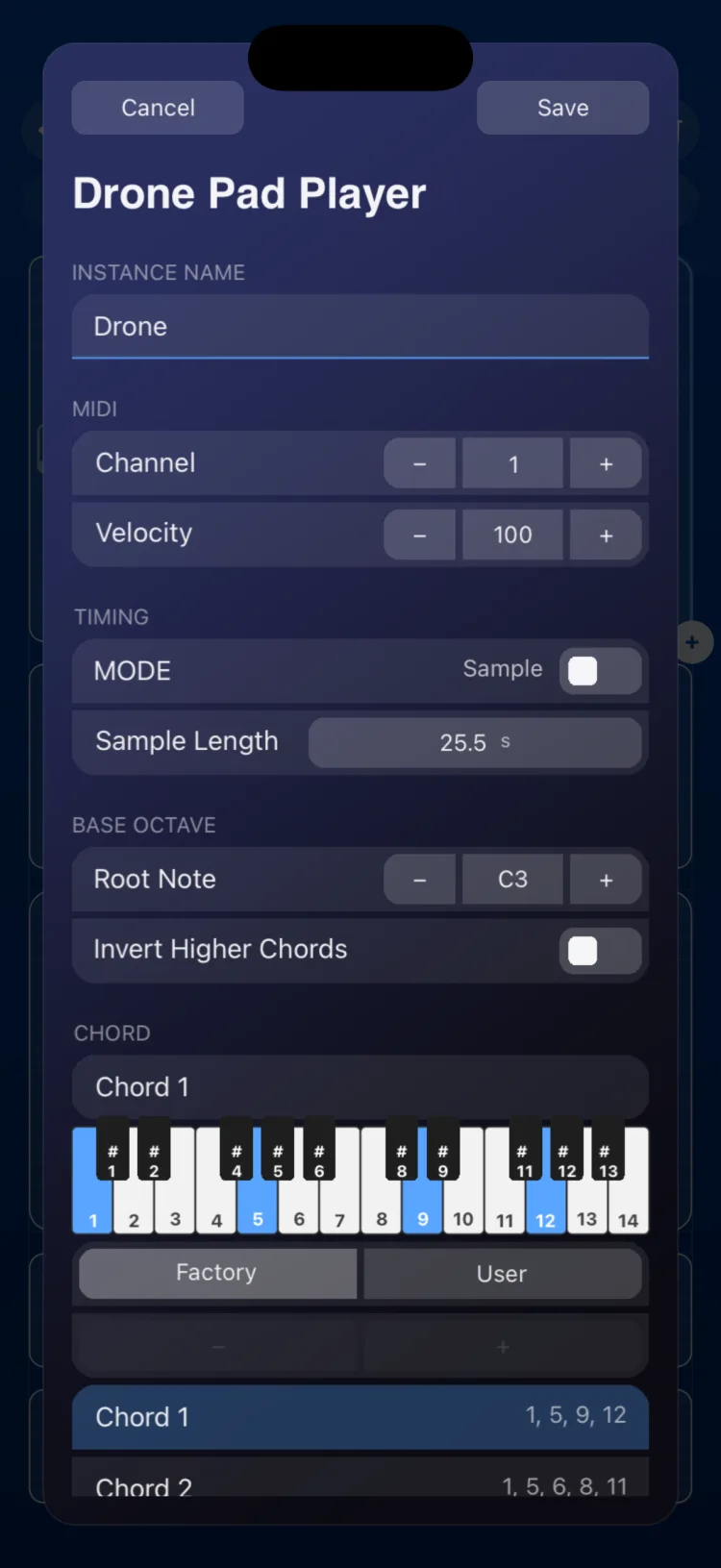
Besides the 8 factory chords (Chord 1 to 8), you can create up to 48 chords of your own in the inspector:
- Under User, tap + to add a chord.
- Mark its notes on the 2-octave keyboard.
- Tap Save and type the name. To remove a chord, tap − and confirm.
User chords form a shared library on the device: when you save a chord, it becomes available in every Drone Pad. Each Drone Pad also keeps a copy inside its scene, and that copy is the one used when the scene opens. The inspector shows the pad's own chords.
Chords travel in the exported settings file (importing it applies them to every Drone Pad) and inside exported scenes. See Settings and Files and backups.
Inspector options
| Section | Option | Values |
|---|---|---|
| INSTANCE NAME | Text | module name |
| MIDI | Channel | 1 to 16 |
| MIDI | Velocity | 0 to 127 (default 100) |
| Timing | Sample Length | 0.5 to 60 s (default 25.5 s); only shown in Sample mode |
| MODE | Sample / Synth | default Sample |
| Base Octave | Root note | C1 to C7 in one-octave steps (default note 60) |
| Base Octave | Invert Higher Chords | keeps every note within two octaves above the base |
| Chord | Factory | 8 chords (Chord 1 to 8) |
| Chord | User | up to 48 chords of your own, with their notes on a 2-octave keyboard and their name; + / − and Save |
| APPEARANCE | Use Global Color / Custom Color |
With other modules
- With Macro Memories you can store and recall up to 8 root and chord combinations.
- It can also be a target of a Toggle in Macro mode (roots set to Off/On), a State and Macro Play.
Limitations
- Only one root can be active at a time.
- On iPhone and iPad, the module measures (in cells, minimum / initial / maximum): iPhone 14×8 / 14×9 / 16×14; iPad 8×7 / 8×7 / 12×14.