
State
A State is a button that stores a snapshot of the controls and engines on its page (or the ones you choose on any page), and recalls it with one tap, instantly or with a smooth transition.
Use it to go from the verse mix to the chorus mix, bring back a synth sound, change the drum pattern, the Drone Pad chord and the tempo all at once, or return to a known starting point.
Storing and recalling
- In the Editor, add Macro State from the MACRO section of the palette.
- In Perform, set the controls the way you want to remember them.
- Touch and hold the State (about 0.8 s). It blinks to confirm it stored the snapshot.
- Tap the State whenever you want to recall that snapshot.
If you turn on Protection in the inspector, touching and holding no longer overwrites the stored snapshot.
Capturing only some controls
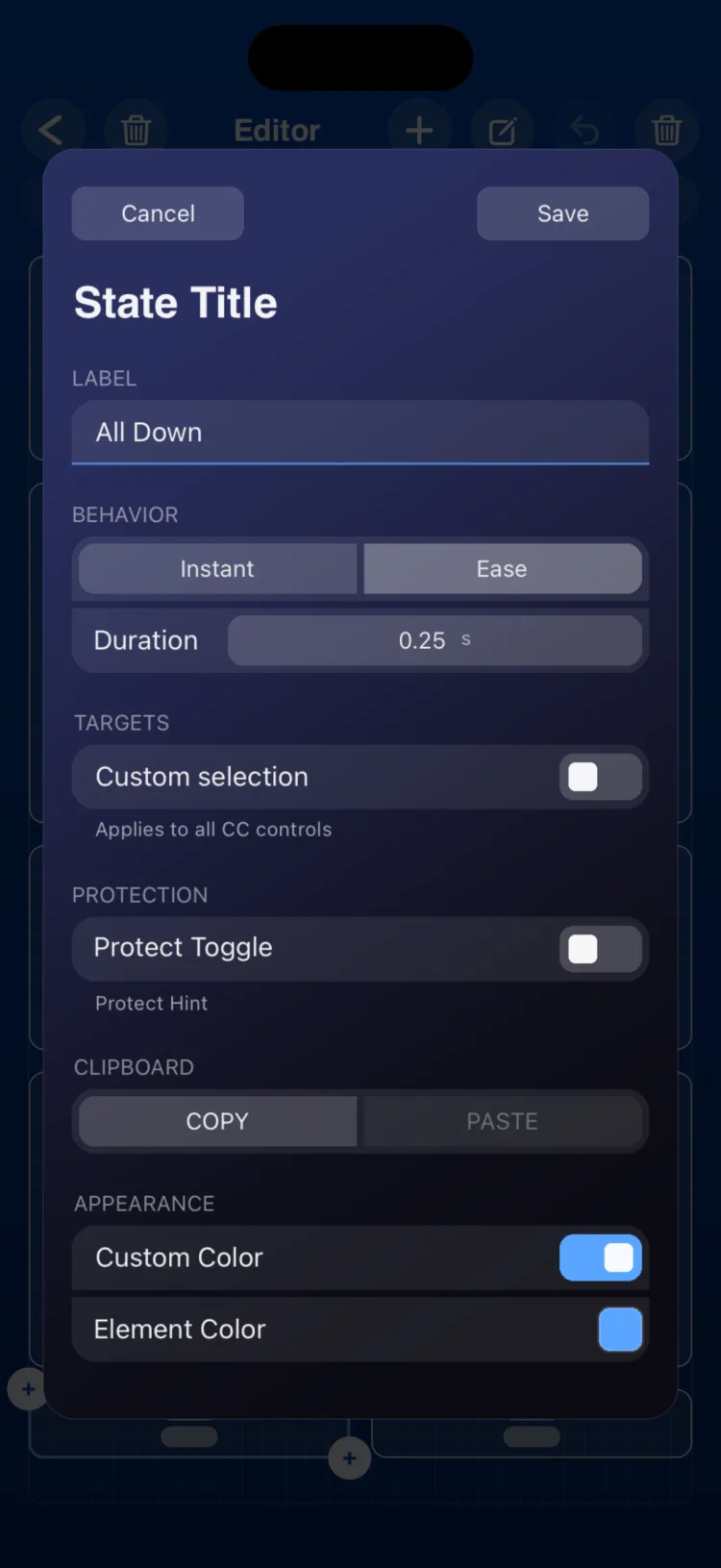
By default, a State captures every control on its page. To narrow it down, turn on Custom selection in the inspector and pick the controls in one of these ways:
- From the inspector: check the targets in the list.
- From Perform: 1. Touch and hold the State. It enters selection mode and its page pill blinks. 2. Tap the controls you want to include. They can be on any page. 3. Tap the State again. This stores both the selection and the snapshot.
Inspector options
| Section | Option | Values |
|---|---|---|
| Label | Text | button name |
| BEHAVIOR | Instant / Ease | default Ease |
| BEHAVIOR | Duration | 0.01 to 120 s (default 1.5 s); Ease only |
| Targets | Custom selection | Off: every control on its page. On: only the chosen ones, on any page |
| Targets | Target list | Fader, Knob, XY, Toggle, Arpeggiator, Drum Player, Drone Pad, LFO, Macro Memories, Macro Tempo, Macro Play |
| Protection | Switch | Prevents touch-and-hold from overwriting the snapshot |
| CLIPBOARD | COPY / PASTE | |
| APPEARANCE | Use Global Color / Custom Color |
What the snapshot stores
| Target | What is stored |
|---|---|
| Fader, Knob | Value |
| XY | X and Y position |
| Toggle | On / Off. A Switch Macro also applies its targets. |
| Arpeggiator | Sync, Retrig, Hold and its type, Mute, Rate, steps, gate, channel, held notes, chord memories and active preset |
| Drum Player | Mute, Sync, Retrig, selected pattern and active preset |
| Drone Pad | Bank and chord, base octave, Mute and active root note |
| LFO | Waveform, Sync, Retrig, division, period, minimum and maximum |
| Macro Memories | Selected memory |
| Macro Tempo | Selected tempo (changes the global BPM) |
| Macro Play | Mute of each connected engine |
How it recalls
- Instant: everything changes at once.
- Ease: Faders, Knobs and XY Pads glide to their values over the chosen duration. Toggles, engines and macros change at once.
Limitations
- It does not store the engines' Play/Stop or the LFO connections.
- It does not include Pads, Keyboard, Pitch Bend or other States.
- The LFO is included when it is on the same page as the State (without custom selection), or when you pick it in the inspector list or in Perform's selection mode.
- Without custom selection, a State only stores and recalls its own page: it does not change controls, LFOs or the Macro Tempo on other pages.
- On iPhone and iPad, the button measures (in cells, minimum / initial / maximum): iPhone 5×2 / 6×2 / 8×4; iPad 3×2 / 4×2 / 12×9.