

Your rig. Your rules.
RigAstra turns your phone or tablet into the MIDI and OSC controller you design yourself: faders, pads, an arpeggiator, a drum player and macros on as many pages as your set needs, all running on one clock.
Every module you need, on one surface
Sixteen modules you place, size and combine freely. Each one sends MIDI, OSC or drives other controls as a macro.
-
MIDIMACROOSC
Fader
Vertical or horizontal, for volumes, filters and sends. MIDI, OSC or macro.
Learn more → -
MIDIMACROOSC
Knob
A rotary control for any CC or OSC value, with its own double-tap action.
Learn more → -
MIDIOSC
XY Pad
Two controllers at once under one finger, sent as two CCs or OSC.
Learn more → -
MIDI
Pad
One note or a chord of up to 12, with velocity by height and bends by swipe.
Learn more → -
MIDI
Keyboard
A polyphonic touch keyboard across all 128 MIDI notes, scrolled from its top bar.
Learn more → -
MIDI
Pitch Bend
A spring-loaded bend that returns to center when you let go.
Learn more → -
MIDIMACROOSC
Toggle
On or off with one tap, momentary or latching — or a macro that moves several controls.
Learn more → -
MIDIMACROOSC
Horizontal Fader
The same fader, laid flat to fit long rows and wide layouts.
Learn more → -
MIDI
Arpeggiator
A step arpeggiator with lanes, per-step velocity and length, and chord memories.
Learn more → -
MIDI
Drum Player
A step drum machine for up to 12 instruments and 8 patterns, in sync.
Learn more → -
MIDI
Drone Pad
Sustained chords in any of the 12 keys, with factory voicings or your own.
Learn more → -
MACRO
LFO
16 waveforms that move your faders, knobs and XY pads, in time or free.
Learn more → -
MACRO
State
Save a whole snapshot of controls and recall it with one tap, with a smooth fade.
Learn more → -
MACRO
Macro Play
Start, stop, solo and mute your arpeggiators, drum players, drones and LFOs together.
Learn more → -
MACRO
Macro Tempo
Shows the scene tempo and jumps through your tempo list with one tap.
Learn more → -
MACRO
Macro Memories
Eight memories that switch drum patterns, arpeggiator chords and drone chords together.
Learn more →

Design the surface you need
Start from an empty page and add exactly what your set calls for. Place each control on the grid, resize it, give it a color and a channel. A scene holds up to 48 pages — one per song, or one per instrument — and you move between them with a tap.

Engines that play in time
The arpeggiator, the drum player, the drone pads and the LFOs all run on the same tempo. Tap the tempo, choose it from your list or follow an external MIDI Clock, and send MIDI Clock to your gear so everything moves together.

One gesture moves many controls
Turn a fader, a knob or a toggle into a macro that moves a whole group of controls at once, each within its own range. Save a State and bring every value back with a single tap, with a fade as short or as long as you want.

MIDI and OSC, the way you connect
Send to several MIDI destinations at the same time over USB, Bluetooth MIDI or the network, and to a Mac over IDAM from your iPhone or iPad. Every control can send OSC to the software you use, with its own address and range.

Made for the stage
Big touch zones, page buttons you can hit without looking and a Stop All that is always where you expect it. If a call comes in or the app goes to the background, RigAstra stops the engines and turns every note off — no hanging notes on stage.

On your phone
- iPhone and Android phones
- A grid laid out for one hand
- Your whole set in your pocket
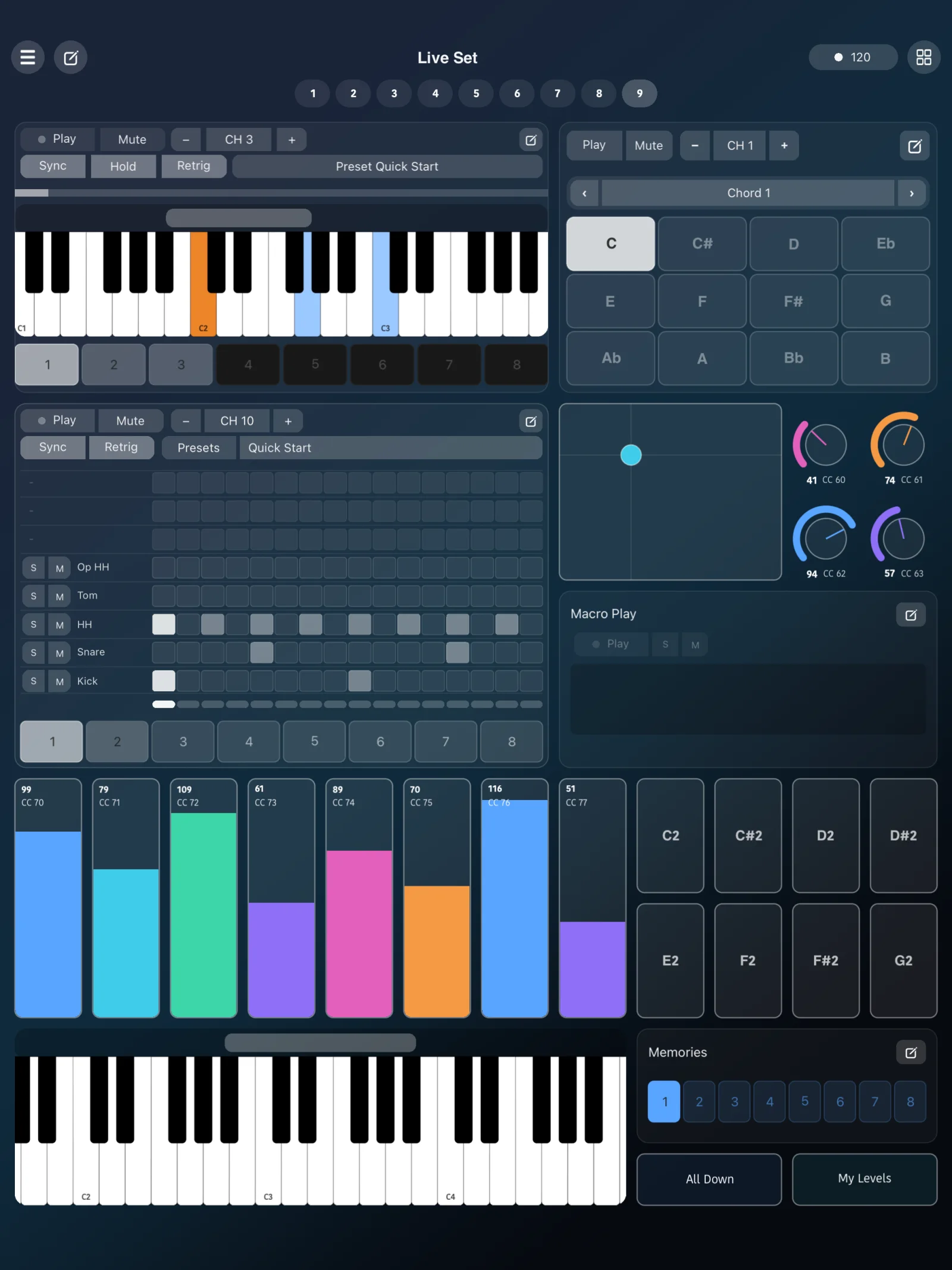
On your tablet
- iPad and Android tablets
- A bigger grid in portrait and landscape
- Room for engines and mixers side by side
Start playing in a minute
RigAstra comes with a Quick Start scene: seven pages with faders, knobs, pads, a drone pad, an arpeggiator and a drum player, ready to connect to your instrument. Play it as it is, or change anything you like.
Frequently asked questions
- What is RigAstra?
- RigAstra is a MIDI and OSC controller for iPhone, iPad and Android phones and tablets. You design your own control surface with faders, knobs, pads, a keyboard, an arpeggiator, a drum player, drone pads, LFOs and macros, and use it to play and control your instruments and software.
- What can I control with it?
- Anything that receives MIDI or OSC: hardware synths, drum machines, effects, a DAW on your computer, lighting or visuals software. RigAstra sends notes, CC, pitch bend and MIDI Clock, and OSC messages to the address and port you choose.
- How do I connect it?
- With a USB MIDI interface or cable, Bluetooth MIDI or network MIDI. From an iPhone or iPad you can also connect to a Mac over IDAM with the charging cable. You can send to several MIDI destinations at the same time.
- Does it keep time with my other gear?
- Yes. The engines share one tempo, which RigAstra can send as MIDI Clock, or follow an external MIDI Clock from another device.
- Can I move my scenes between devices?
- Yes. Export your scenes, presets and settings as files and open them on another iPhone or iPad. RigAstra also keeps rotating backups of your scenes on the device.
- Does RigAstra collect any data?
- No. There is no analytics, no accounts, no advertising and no tracking. Everything stays on your device.
Specs
- Platforms
- iPhone and iPad · Android phones and tablets
- Connections
- USB MIDI · Bluetooth MIDI · network MIDI · IDAM to a Mac (iPhone and iPad) · OSC over your local network
- MIDI
- Notes, CC, pitch bend, MIDI Clock out and external MIDI Clock in
- Scenes
- Up to 48 pages per scene · presets for pages, arpeggiators, Drum Players and scenes
- Languages
- English, Spanish, German, French, Japanese, Korean, Portuguese and Chinese